







How to Track Fitness Rewards Points: A Step-by-Step Guide
Table of Contents
- How Fitness Rewards Apps Work
- Setting Up Your Rewards Account and Connecting Wearables
- Tracking Your Fitness Metrics and Activity Points
- Best Fitness Apps With Rewards to Track Your Progress
- How to Redeem Gym Loyalty Points for Gift Cards and Incentives
- Troubleshooting Fitness App Point Tracking Issues
- Tax Implications and Point Expiration Policies You Need to Know
- Conclusion
How Fitness Rewards Apps Work
Fitness rewards apps track your physical activity and convert movement into points you can redeem for real incentives. They gamify workout consistency by attaching tangible rewards to the habits you're building.
The mechanics are simple: log workouts, sync data from wearables, accumulate points, redeem them for gift cards or merchandise. Most apps use one of two calculation methods. Some award points based on duration and intensity, a 45-minute heavy strength session earns more than a 20-minute walk. Others use tiered systems where hitting specific milestones unlocks bonus multipliers. Both reward consistency over sporadic effort.
The real value isn't the points themselves, it's the behavioral anchor. When every workout feeds a tangible reward, you're more likely to show up consistently. That consistency drives results. The points are the mechanism that keeps you accountable.
Tiger Fitness offers a rewards program designed to support your training. When you're buying supplements to support your training, you want those purchases to matter beyond the product itself. Our rewards system ties directly to your fitness journey, the more active you are, the more value you extract from every dollar spent.
Tracking happens automatically when you connect compatible devices or manually log activities. Real-time dashboards show your current balance, redemption options, and progress toward tier bonuses. Most platforms use push notifications to reinforce progress and remind you of expiration dates.
Setting Up Your Rewards Account and Connecting Wearables
Creating Your Account
Download the app or visit the web platform. You'll need basic information: email, password, and fitness profile details (age, weight, fitness level, goals). The app needs this data because it informs point calculations, a 300-pound athlete doing 10 miles burns more calories than a 150-pound person doing the same distance.
Configure your preferences: choose daily, weekly, or monthly point summaries and set redemption preferences. Verify your email address immediately to activate your account and receive notifications about point balances and expiration policies. Create a strong password, your rewards account ties to payment methods and personal health data.
Syncing Wearable Devices to Your Rewards Platform
Once your account is live, connect your wearable. Most fitness rewards apps support Apple Watch, Garmin, Fitbit, Oura Ring, and Whoop.
Go to account settings and find "Connected Devices" or "Integrations." Select your wearable brand and you'll be redirected to that device's authorization page. Log in with your wearable credentials and approve the permissions request, the app needs access to activity data, step counts, heart rate, and workout logs.

The sync typically completes within 5-10 minutes. Historical data from the past 30-90 days will backfill into the rewards app. From that point forward, data syncs automatically within 2-4 hours of a completed workout.
If your wearable isn't supported, most platforms allow manual activity entry. You log the workout details yourself: duration, type, estimated calories burned. Manual entries are less precise than device-captured data, so some apps award slightly fewer points for them.
Test the connection by completing a workout and checking your rewards dashboard 4 hours later. If points appear, the sync is working. If not, disconnect and reconnect the device.
Tracking Your Fitness Metrics and Activity Points
Understanding How Points Are Calculated
Points calculation varies by platform, but most use this formula: base points (for completing a workout) plus multipliers (for hitting intensity thresholds or streak bonuses).
A typical structure:
- 1 minute of moderate activity = 1 point
- 1 minute of vigorous activity = 1.5 points
- Daily step goal completion = 10 bonus points
- 7-day workout streak = 25 bonus points
- Monthly activity milestone = 50-100 bonus points
Some apps factor in biometric data. If your wearable captures heart rate zones, the app might award extra points for time spent in elevated zones. This rewards intensity, not just volume.
Most platforms don't award points for rest days or low-activity days. You earn points through action. This reinforces the behavioral change the app is designed to create.
Read your app's point calculation policy carefully. Some apps devalue manually entered data (giving 80% of device-tracked points) to incentivize wearable syncing. Others have point caps, you can't earn more than 500 points per week regardless of activity volume. These limits prevent gaming the system.
Monitoring Your Points Balance in Real-Time
Your rewards dashboard shows your current balance, points earned this week and month, progress toward your next reward tier, expiration dates, available redemption options, and your activity streak counter.
Check this dashboard weekly. You need to know where you stand. If you're 50 points away from a gift card you want, you know exactly how much activity you need. If you have points expiring in 30 days, you can plan your redemption before they vanish.
Set calendar reminders for point expiration dates. Most platforms send notifications, but don't rely on that alone. If you've earned 200 points expiring in 14 days, you need to redeem them or lose them.
Some apps offer point rollover options to extend expiration dates if you're close to a redemption goal. Check your app's policy and use it strategically.
Best Fitness Apps With Rewards to Track Your Progress
Strava combines social accountability with rewards. You log workouts, compete with friends on segments, and earn points based on activity volume and consistency. The social element keeps users engaged longer than solo tracking apps. Best for athletes who thrive on community competition.
Apple Health integrates natively with iPhone and Apple Watch. It tracks activity rings, workout data, and step counts without requiring a separate app download. Rewards integration varies by carrier and employer, some health insurance plans offer point bonuses for Apple Health activity. Best for Apple ecosystem users with employer-sponsored wellness programs.
Fitbit (owned by Google) tracks activity, sleep, and heart rate with excellent wearable hardware. The rewards program offers points for daily activity goals and challenges. The app's strength is sleep tracking integration. Best for users prioritizing sleep data alongside activity tracking.
Garmin caters to serious athletes. The ecosystem tracks running, cycling, swimming, and strength training with granular detail. Garmin Connect offers point-based rewards for activity milestones. Best for endurance athletes and triathletes.
MyFitnessPal combines activity tracking with nutrition logging. You can sync workouts and earn points, but the app's real value is integrated calorie and macro tracking. Best for people focused on body recomposition who want activity and nutrition data in one place.
Peloton rewards consistency within the Peloton ecosystem. If you use Peloton bikes, treadmills, or classes, you earn points toward merchandise and class packages. Best for users already invested in Peloton hardware.
When selecting an app, match it to your primary activity. A runner benefits from Strava or Garmin more than MyFitnessPal. A strength athlete needs detailed rep-based logging, which MyFitnessPal handles better than Strava. Don't chase the app with the "best" rewards, choose the one that tracks your actual workouts accurately. If you want to dial in your training and nutrition simultaneously, check out our FREE TOOLS & FITNESS CALCULATORS to complement whatever tracking app you choose.
How to Redeem Gym Loyalty Points for Gift Cards and Incentives
Once you've accumulated points, redemption is straightforward. Open your rewards dashboard and navigate to the redemption portal. You'll see available options with point costs listed clearly.
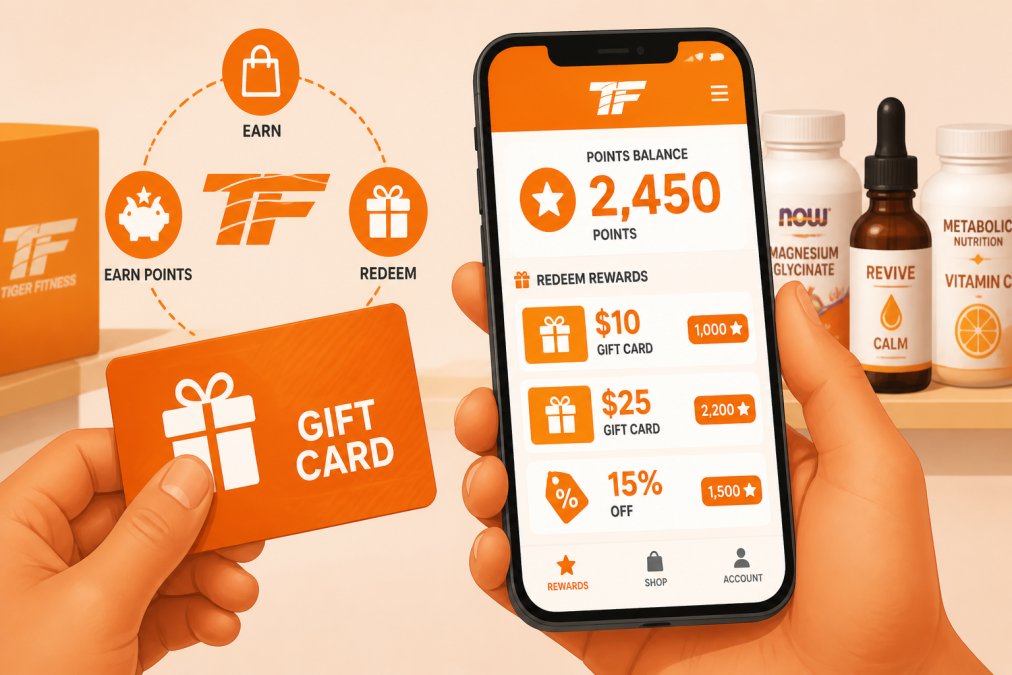
Most platforms offer these redemption categories:
Gift Cards (most common): Amazon, Target, Starbucks, restaurant chains. These typically cost 500-2,000 points depending on card value. The conversion rate is transparent.
Fitness Gear: Workout apparel, recovery tools, supplements, wearables. Point costs vary widely. The value proposition is often weaker than gift cards, you're paying more in points than the item costs retail.
Subscription Extensions: Premium app features, streaming services, fitness platform memberships. These offer decent value if you're already paying for the service.
Charitable Donations: Many apps let you donate points to nonprofits. The app typically matches donations or provides a tax deduction pathway.
Exclusive Experiences: Some platforms offer limited-time experiences, virtual training sessions with athletes, or early access to new products. These are higher-point redemptions but deliver unique value.
Strategy: redeem for gift cards or subscriptions you'd actually pay for anyway. Don't chase low-value merchandise just because it's available. If you earn 1,500 points but the only appealing redemption costs 2,000, wait. Accumulate the extra 500 points.
Check expiration policies before redeeming. If you have 1,800 points expiring in 60 days and no redemption option appeals to you, pick the best available option rather than lose the points entirely.
Troubleshooting Fitness App Point Tracking Issues
When points aren't appearing as expected, work through these diagnostics systematically.
Workout logged but points didn't post: Wait 4-6 hours. Data syncing isn't instantaneous. If 24 hours pass with no points, the issue is real.
Wearable connected but data isn't syncing: Disconnect the device from the rewards app. Verify that recent workouts appear in your wearable's native app. If workouts show there but not in the rewards app, the problem is the integration connection. Disconnect and reconnect the wearable through the rewards app's settings.
Points balance shows a lower total than expected: Check for point expiration. Navigate to your account settings and look for an "Expiration History" section. Points often expire after 12 months of inactivity.
Manual activity entry didn't award full points: Some apps penalize manual entries to incentivize device syncing. To fix this, sync a wearable device going forward.
Points redeemed but the gift card didn't arrive: Check your email for redemption confirmation. Most platforms send confirmation with a delivery timeline (usually 5-10 business days for digital gift cards, 2-3 weeks for physical merchandise). If the timeline hasn't passed, wait. If it has, contact customer support with your redemption confirmation number.
Account shows zero points after a full month of activity: This suggests a syncing failure at the account level. Sign out completely, clear your app cache, and sign back in. If points still don't appear, disconnect all devices, restart your phone, and reconnect your wearable fresh.
Most issues resolve within 24-48 hours of troubleshooting. If a problem persists, contact the app's support team directly with your account email, recent workout dates, and point totals.
Tax Implications and Point Expiration Policies You Need to Know
Tax treatment of fitness rewards: Points you earn through activity tracking are generally not taxable income. You're participating in a loyalty program, not receiving compensation. The IRS doesn't tax loyalty program rewards in most cases. However, if you redeem points for a large gift (over $600 in value in a single calendar year), some platforms may issue a 1099-NEC form. If you receive one, report it on your tax return. Consult a tax professional if uncertain about your specific situation.
Gift card redemptions are not taxable events. When you redeem points for a gift card, that's not income. You only face tax implications if you later resell the gift card for cash.
Charitable donations made through points have no personal tax benefit. You can't deduct points you donated as a charitable contribution.
Point expiration policies vary significantly. Most apps expire points after 12 months of inactivity. Some expire after 18 months. A few never expire points. Check your app's terms of service.
Here's the critical part: expiration clocks reset when you earn new points. If you earned 500 points on January 1, 2026, and don't log any more activity, those points expire January 1, 2027. But if you log a workout on December 15, 2026, your original 500 points get a fresh 12-month window. This incentivizes consistent engagement.
Some platforms offer point preservation options. You might be able to donate expiring points to charity or extend expiration if you're close to a redemption goal. Check your app's settings before points expire.
Promotional points sometimes have shorter expiration windows. If an app awards 100 bonus points for signing up, those might expire after 90 days. Read the promotion details carefully.
Treat points like cash with an expiration date. Track expiration dates on your calendar. Redeem before you lose them.
Tracking fitness rewards points is straightforward once you understand the mechanics. The real challenge is consistency. Points are worthless if you don't earn them, and earning them requires showing up to your workouts week after week.
Tiger Fitness built our rewards program around this reality. We know that when you're investing in your fitness, buying supplements, committing to training, you want that investment to compound. Our rewards program gives you tangible value for the effort you're already putting in. Every purchase, every workout you log, every goal you hit feeds directly into rewards you can actually use. That's not just gamification, that's respect for your commitment. Start tracking your points today and watch how the small wins accumulate into real incentives that fuel your next phase of progress.
Frequently Asked Questions
How do I check my fitness rewards balance?
Log into your rewards app and navigate to your account dashboard. Most platforms display your current points balance prominently on the home screen. You can also check your balance through connected wearable devices or by syncing your fitness data. If your app supports push notifications, enable them to receive real-time updates when points are added after workouts. Some apps also send weekly email summaries of your points activity.
Can I sync my wearable device to track rewards points across multiple platforms?
Yes, most modern wearables support multi-platform data synchronization. Popular devices like Apple Watch, Fitbit, and Garmin can connect to multiple fitness reward apps simultaneously. Check your wearable's settings for available app integrations. Some platforms use OAuth authentication, which securely links your accounts without sharing passwords. Verify that your specific wearable model is compatible with the rewards apps you want to use before purchasing.
What happens to my fitness rewards points if I cancel my gym membership?
Point expiration policies vary significantly by platform and gym. Some apps allow you to retain points indefinitely after cancellation, while others expire points within 30-90 days. Review your rewards program's terms and conditions before canceling. Many platforms let you redeem remaining points for gift cards or store credit before your membership ends. If uncertain, contact customer support to clarify your specific account's point expiration rules and redemption options.
Are there tax implications for fitness rewards incentives I receive?
Yes. Under IRS guidelines, fitness rewards with monetary value may be considered taxable income. Gift cards, cash bonuses, and merchandise rewards typically qualify as taxable compensation. However, certain employer-sponsored wellness programs may offer tax-free rewards up to specific limits. Track all rewards you redeem for tax reporting purposes. Consult a tax professional or accountant to determine your specific tax liability, as rules vary based on the rewards type and your employment situation.
Leave a comment