







How to time pre-workout supplements around TrainingPeaks workouts
Instead of recalculating when to take pre-workout before every TrainingPeaks session, work backward from your actual warm-up time and set a separate calendar reminder using the product’s directions. This guide shows you how to check the workout, schedule the reminder, and revise it when training moves—without treating a calendar alert as an instruction to take another serving.
TL;DR
- TrainingPeaks pre-workout timing starts with your actual warm-up time and the product label, not the workout’s intensity score.
- Use TrainingPeaks for workout context and a separate calendar notification for your supplement decision.
- Tigerfitness sells pre-workout supplements; reminder setup and schedule changes remain your responsibility.
- When a session moves after you take pre-workout, update the workout plan rather than automatically taking another serving.
Why this matters
A workout date does not tell you when you will actually start moving. Travel, equipment setup, coach changes, and evening commitments all affect the gap between taking a supplement and beginning your warm-up.
The useful workflow connects a confirmed start time to a label-based reminder—not a harder workout to a larger serving. TrainingPeaks supplies the session context; your calendar supplies the alert.
Tigerfitness is best for athletes shopping for pre-workout supplements, not for managing TrainingPeaks reminders. Use Tigerfitness for supplement shopping and keep scheduling decisions in your training workflow.
This 2026 setup uses a separate Google Calendar event. It does not depend on a supplement integration, automatic serving calculation, or a coach’s workout description containing dosing instructions.
Before you start
- Workout access: Have access to your TrainingPeaks schedule and the session details. Confirm the actual warm-up time with your coach or training partners; a workout assigned to a date is not a confirmed appointment.
- Label and health check: Have the current product label, serving directions, warnings, and your other caffeine sources ready. Ask a clinician or pharmacist before using pre-workout if you take medication, have a medical condition, are pregnant or breastfeeding, or have been advised to avoid stimulants. This guide is for adults.
- Reminder access and the gotcha: Have Google Calendar and working device notifications. A separately created reminder is independent of the TrainingPeaks workout: moving the workout does not update that reminder. Assign yourself responsibility for changing both.
Session check
- Open TrainingPeaks on the web and select Calendar.
- Open the intended workout. Read the session description, planned duration, warm-up, main work, and any coach instructions that are present.
- Identify the session’s purpose: easy training, demanding intervals, strength work, or competition preparation. Use this context to decide whether a supplement belongs in the session at all.
- Write down your actual warm-up start in a separate note. Include the date and local time zone when traveling.
- Identify the latest realistic start that still leaves room for the workout and your normal sleep schedule.
Expected result: You have a specific warm-up appointment, not just a workout sitting on a date.
Do not use Training Stress Score, workout color, or planned duration as a supplement dosing formula. Those details do not establish your caffeine tolerance, medication interactions, or the contents of your pre-workout.
For your 2026 training calendar, distinguish the scheduled arrival from the start of movement. If you reach the gym before you change clothes and set up equipment, the arrival time is the wrong reference point.
An easy session also deserves an explicit decision. Choosing no pre-workout keeps the routine from becoming an automatic response to every item on the calendar.
Label check
- Read the directions on the exact product and version you will use. Record its stated pre-exercise timing, serving instructions, and warnings without substituting directions from another formula.
- Check caffeine per serving when disclosed. Count coffee, energy drinks, gels, and other supplements already consumed or planned that day.
- Choose a caffeinated product, a caffeine-free product, or no pre-workout based on the label, your health guidance, prior tolerance, and sleep plans.
- Subtract the label’s timing interval from the confirmed warm-up start. If the directions are unclear, contact the manufacturer rather than inventing a timing window.
- Put the resulting time beside the workout in your separate planning note.
Expected result: You have a documented decision and, if using a supplement, a label-based reminder time.
Which approach fits the session?
| Approach | Best for | Advantage | Limitation |
|---|---|---|---|
| Familiar caffeinated pre-workout | Adults who tolerate caffeine and can use it without disrupting sleep | Caffeine can support exercise performance | Adds to daily caffeine exposure and can cause unwanted effects |
| Caffeine-free pre-workout | Adults avoiding caffeine who still want a pre-workout routine | Avoids caffeine from that product when the label confirms none | Ingredients still need review; caffeine-free does not mean risk-free |
| No pre-workout supplement | Easy sessions, uncertain tolerance, or days when warnings rule out use | Removes supplement-related stimulant exposure | Does not provide the effects of a pre-workout formula |
Choose the approach before creating the alert. A reminder should prompt a decision you have already checked, not pressure you into taking something because your phone buzzed.
For caffeinated products, 30–60 minutes before exercise is a commonly studied timing range, not a universal instruction for every formula. Follow the product directions and recognize that absorption and individual responses vary.
Creatine and beta-alanine are different timing questions: their established exercise uses depend on consistent intake over time rather than a precisely timed, same-day stimulant effect. Their presence in a blend does not justify another serving when training starts late.
Use the guide to taking pre-workout safely for the broader safety checklist. For this workflow, the immediate task is narrower: establish whether to use the product, then determine when.
Reminder setup
- Open Google Calendar on the web. Select Create, then Event.
- In Add title, enter a decision-focused name such as Pre-workout check: morning intervals. Avoid a title that tells you to take another serving automatically.
- Set the event date and start time to the calculated supplement-check time. Use a short event duration that fits your calendar; the event does not represent the workout itself.
- In Add description, enter the workout’s warm-up start, product name, label timing, caffeine check, and the instruction: If the workout changes, reassess before taking anything.
- Select Add notification and choose Notification. Set the alert to the start of this check event, or earlier if you need preparation time.
- Select Save. Create a temporary test event to verify that notifications reach the device you will carry.
Expected result: A visible event and a working alert prompt you to review the supplement decision at the intended time.
Worked scheduling example
Suppose your warm-up starts at 7:00 a.m. and your product’s directions specify taking it 30 minutes before exercise. Schedule the supplement-check event for 6:30 a.m.; those times are an illustration, not product directions.
If you add a notification 10 minutes before that event, it arrives at 6:20 a.m. That is a preparation alert—not a reason to take the supplement earlier than planned.
For a 2026 calendar, put the year on the event when duplicating an old template, and verify the date before saving. A correctly calculated clock time attached to the wrong date is still a failed reminder.
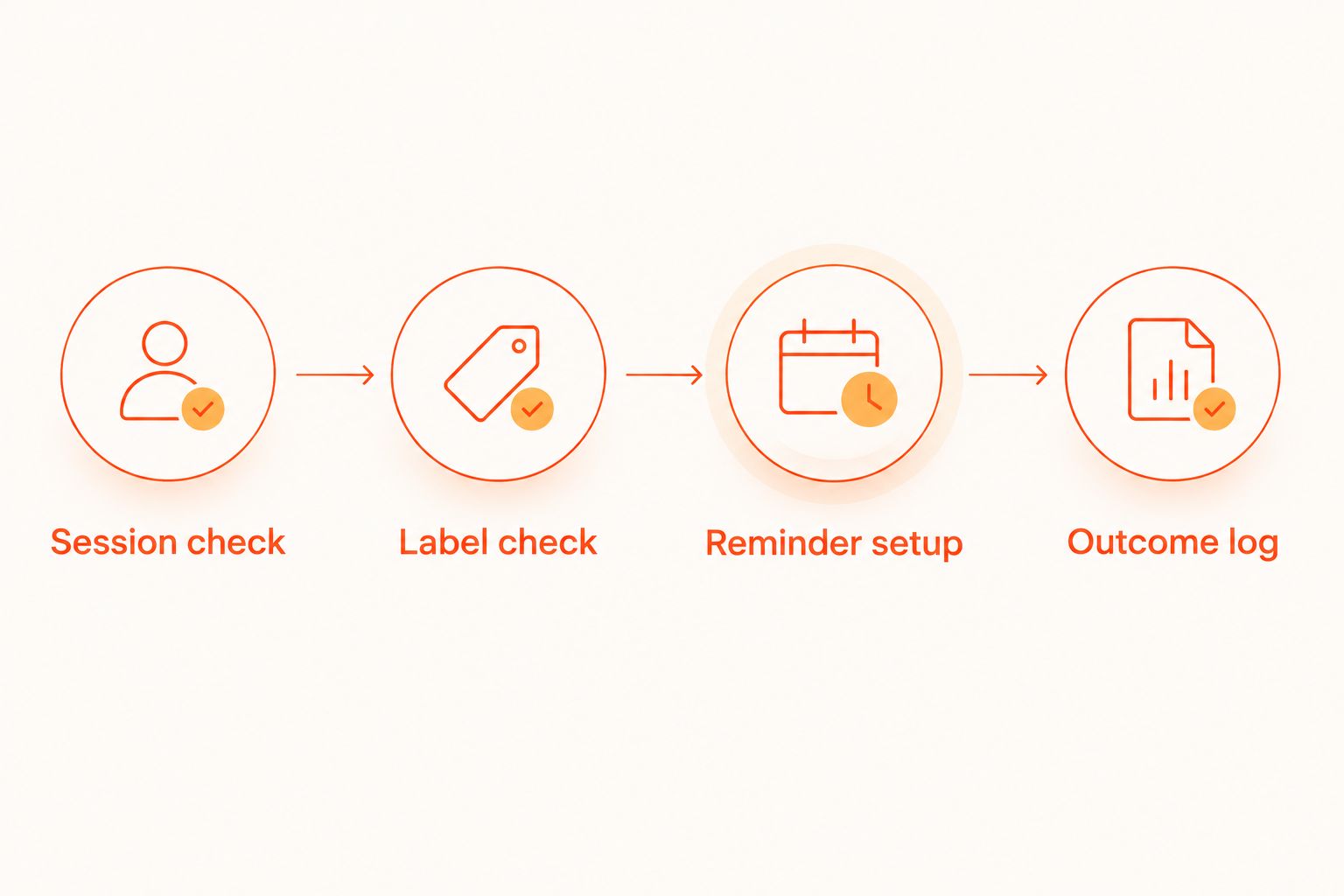
The complete sequence is Session check, Label check, Reminder setup, then Outcome log. Keep those jobs separate so one schedule change does not quietly change your supplement decision.
Outcome log
- After training, record the actual warm-up start and the time you took the supplement, if any. Use your training notes or a separate log you can review alongside TrainingPeaks.
- Record the exact product and serving used, caffeine from other sources, and whether you trained after eating.
- Describe the session plainly: completed as planned, shortened, unusually difficult, or interrupted. Add stomach comfort, jitters, and that night’s sleep when relevant.
- Compare similar sessions before changing the routine. Keep food, workout timing, and other caffeine sources as consistent as practical.
- Change one part of the routine at a time, within label directions. Do not escalate servings to compensate for poor sleep or an unexpectedly hard workout.
Expected result: You can distinguish a scheduling mistake from a product-tolerance issue without relying on memory.
Tigerfitness pre-workout supplements belong in the same log as other caffeine sources, not in a separate mental category. A coffee and a pre-workout still contribute to the same day’s intake.
A good workout does not prove that a supplement caused the improvement. Training, food, sleep, weather, and normal day-to-day variation all affect performance. Your 2026 log is a decision aid, not a controlled experiment.
Update the reminder whenever the workout changes
Best for: athletes with variable start times or coach-adjusted schedules. Use an event-by-event update rather than a recurring supplement alarm when sessions move often.
- Reopen the revised TrainingPeaks workout and confirm whether its purpose changed as well as its date.
- Confirm the new warm-up start. Do not calculate from an unconfirmed arrival time.
- Check whether you have already taken the product. If you have, do not create a replacement-serving instruction.
- Edit the separate Google Calendar event to the new check time, or delete it if you are skipping the supplement.
- Recheck caffeine exposure and bedtime before saving the change.
Expected result: The calendar reflects the current plan without leaving an obsolete alert behind.
This variant is especially useful when an early session becomes an evening session. A familiar morning product does not automatically fit the new sleep schedule. Choose no pre-workout or consider a suitable caffeine-free option after reviewing its ingredients and warnings.
For double-session days, treat the second session as a fresh safety review—not a repeat of the morning serving. TrainingPeaks can show two workouts; that does not establish that two servings are appropriate.
Troubleshooting
The alert did not appear
Check Google Calendar notification settings, device permissions, and notification-suppression settings such as Do Not Disturb. Run another temporary test before relying on the workflow. A calendar entry visible on screen does not prove push notifications work.
The coach moved the workout, but the reminder stayed put
Edit or delete the separate event manually. This guide creates a companion reminder, not a synchronized supplement integration. Make reminder review part of every workout reschedule.
You took pre-workout, then the session was delayed
Record the actual intake time and reassess the training plan. Do not take another serving just to recreate the original timing window. If you feel unwell, stop exercising; seek urgent care for chest pain, fainting, or severe symptoms.
Evening workouts are disrupting sleep
Remove the automatic caffeinated reminder and review timing and total caffeine exposure. Caffeine effects can persist for hours. A caffeine-free option still requires a label review, and skipping pre-workout remains a valid choice.
Your stomach feels worse during the warm-up
Stop using the product until you have reviewed its directions and your response. Check serving accuracy, food timing, and other products taken together; do not keep increasing the serving or changing several variables at once. Seek medical advice for persistent or significant symptoms.
Customize your workflow
Build a weekly review around your 2026 TrainingPeaks schedule. Confirm key sessions, identify late workouts, and check which days need a reminder rather than copying an alert across the entire week.
For travel, add the destination time zone to the planning note and verify the calendar event after arrival. For races, follow the event’s supplement rules and test any permitted routine during training first.
Keep recurring daily supplements separate from session-specific reminders. Tigerfitness pre-workout shopping can help you compare formats, but a product’s format does not establish its caffeine content or onset time. Read the current label every time you change formulas.
FAQ
How long before a TrainingPeaks workout should I take pre-workout?
Follow your exact product’s directions and calculate backward from your actual warm-up start. For caffeine, 30–60 minutes before exercise is a commonly studied range, but it is not a universal instruction for every pre-workout formula.
Can TrainingPeaks automatically remind me to take pre-workout?
This workflow uses a separate Google Calendar notification rather than relying on TrainingPeaks to issue supplement reminders. Update the reminder yourself whenever the workout’s actual start changes.
Should I time pre-workout before the warm-up or the first interval?
Use the start point specified by your product’s directions; when the directions say before exercise, plan around the warm-up start. Do not treat the first hard interval as the beginning of all exercise.
Should a higher Training Stress Score mean more pre-workout?
No. Training Stress Score is not a supplement dosing instruction and does not account for caffeine exposure, product ingredients, health conditions, or individual tolerance.
What should I do if my workout moves after I take pre-workout?
Do not automatically take another serving. Record when you took the product, review its warnings, and reassess the workout and sleep schedule.
Is caffeine-free pre-workout better for evening TrainingPeaks sessions?
Caffeine-free pre-workout avoids caffeine from that product when the label confirms none, which makes it an option for adults avoiding evening caffeine. It is not automatically necessary or risk-free; review the other ingredients and consider skipping pre-workout.
Do creatine and beta-alanine need the same reminder as caffeinated pre-workout?
No. Creatine and beta-alanine depend on consistent intake over time rather than precise timing before an individual workout. Follow their directions separately and account for ingredients already present in a pre-workout blend.
One last thing
The best reminder includes permission to skip. Add this sentence to the event description: Check the current workout, today’s caffeine, and tonight’s sleep before deciding.
That small change makes the alert a checkpoint instead of a command. The goal is a repeatable training routine—not a perfect record of taking supplements.
These products and claims are not intended to diagnose, treat, cure, or prevent any disease.
Leave a comment